
 Call us at (877) 892-8249
What is vishing? Voice phishing and AI voice cloning
Vishing, short for voice phishing, is a scam in which someone uses a phone call or voice message to impersonate a trusted person or organization and pressure the target into sharing information, sending money, or handing over account access.
Key takeaways
- Vishing is phishing conducted through a phone call or voice message.
- A scammer may impersonate a bank, government agency, employer, support representative, friend, or family member.
- Caller ID spoofing and AI voice cloning can make an impersonation appear more convincing.
- Do not share codes, passwords, sensitive personal information, or payment details in response to an unexpected call.
- Hang up and contact the person or organization through a number or channel you independently verify.
- If you disclosed sensitive information or sent money, secure the affected accounts and begin recovery steps immediately.
Caller ID spoofing makes a familiar number mean nothing. AI voice cloning means a familiar voice means nothing either. If a caller makes an unexpected or urgent request, the safest move is to hang up and verify through a number or channel you already trust, not one they give you.
The voice knows your name, maybe even the last four digits of your account. They need to verify something urgently and just need you to confirm a few details.
By the time something feels off, the information is already gone. This guide covers how vishing attacks work, what the warning signs look like, and what to do if you have already responded to one.
What is vishing?
Vishing is a social-engineering attack carried out over a phone call or voice message. The term combines "voice" and "phishing," and it describes any attempt to manipulate a person through spoken communication into revealing personal data, financial information, authentication codes, account access, or money. Vishing can occur through live calls, prerecorded robocalls, or voicemail messages. It is not defined by a single script or technology. Instead, it describes the method of deception, regardless of the specific story the scammer tells.
What does a vishing call sound like?
Vishing calls follow recognizable patterns, though not every scam includes all of them.
Common elements of a vishing scam can include:
An unexpected problem or emergency the caller insists you must address immediately
Pressure to act right now, often with a countdown or deadline
A demand for secrecy — "don't tell anyone about this call"
A request for sensitive information such as a password, Social Security number, or one-time authentication code
An unusual payment request, such as wire transfer, gift cards, or cryptocurrency
A warning not to hang up or independently verify the claim
A request to install software or grant remote access to your computer
How a vishing attack works
A typical vishing attack starts with impersonation, creates urgency or fear, asks the target to take a risky action, and tries to prevent independent verification.
Step 1: The scammer chooses a trusted identity
The caller pretends to be someone the target would normally trust or comply with. Common impersonations include a bank or credit-card provider, a government agency such as the IRS or Social Security Administration, an employer or company executive, a technical-support representative, a delivery company, a police department, or a friend or relative in an emergency.
Step 2: The caller creates urgency or authority
Pressure is central to vishing. The caller may claim your account has been compromised, a payment is overdue, you face arrest or legal action, a family member is in danger, or a workplace payment must be processed immediately. The goal in this step is to make you feel that pausing or verifying would be risky or disrespectful.
Step 3: The caller asks for information, access, or money
Once trust and urgency are established, the scammer makes a specific request. This could be a password or authentication code, a Social Security number or account number, card or banking details, a wire transfer or gift-card payment, remote access to a computer, or clicking a link sent during the call. Each of these actions gives the attacker something they can exploit.
Step 4: The scammer discourages verification
A critical red flag is resistance to independent verification. A legitimate caller will not object if you say, "Let me call you back on the number from your website." A scammer will insist you stay on the line, claim the situation is too urgent to pause, or warn that hanging up will make things worse. This resistance is itself one of the strongest indicators that a call is fraudulent.
How AI voice cloning can be used in vishing
AI voice cloning uses audio samples to generate speech that resembles a real person. In a vishing scam, a cloned or imitated voice may be used to make an urgent request appear to come from a relative, executive, colleague, or other trusted person.
It is important to understand several nuances. A voice that sounds familiar is not reliable proof of identity. The audio quality and realism of cloned voices can vary significantly. You should not rely solely on detecting pauses, robotic speech, or audio glitches to spot a fake. Some clones sound convincing, while some legitimate calls have poor audio quality. The safest approach is to verify the request rather than trying to judge whether the voice sounds "real."
Can scammers clone the voice of a family member?
Yes, it is possible to imitate or generate a familiar-sounding voice. Publicly available recordings, social media videos, or previously obtained audio may increase the risk of a convincing impersonation. However, the safest response is not to become an audio forensics expert on the spot. Instead, verify the caller's identity through a trusted, separate channel, such as calling the person back on a saved number or checking with another family member before acting on any urgent request.
How families can prepare for voice-cloning scams
Families can reduce their vulnerability by taking a few proactive steps:
Establish a private verification word or question. Agree on a code word or personal question that only family members would know. Do not share it publicly or with unexpected callers.
Call back on a saved number. If a family member calls with an emergency request, hang up and call their known number directly.
Contact another family member. A second person can often quickly confirm or deny the supposed emergency.
Check through a separate channel. A text, video call, or message through a platform you already use can help confirm identity.
A family code is a useful additional check, but it is not a guarantee. Treat a code word as one layer of verification, not the only one.
Warning signs of a vishing call
The following signs may indicate a vishing attempt. Use them as prompts to pause and verify, not as a definitive checklist:
The call is unexpected.
The caller demands immediate action.
The caller threatens arrest, account closure, or financial loss.
The caller asks for a password or authentication code.
The caller requests an unusual or irreversible payment method.
The caller demands secrecy.
The caller refuses to let you verify the claim independently.
The caller asks you to install software or grant remote access.
The story or request is inconsistent with the supposed person's normal behavior.
No single warning sign proves that a call is fraudulent, and a polished or familiar-sounding call can still be a scam. Independent verification is the most reliable next step.
If the caller claims to represent a business or agency
Find the official number on the organization's website, mobile app, account statement, or the back of your payment card.
Start a new call rather than accepting a transfer or callback from the suspicious caller.
Ask the organization whether the claimed problem or request is real.
Never assume the displayed caller ID is authentic.
If the caller sounds like someone you know
Call the person's saved number directly. Do not redial the number that contacted you, even if it looks the same.
Ask a prearranged question or use your family verification word.
Contact another trusted person who can confirm or deny the situation.
Do not send money or information until the claim is independently confirmed.
Is vishing the same as phishing, smishing, or spoofing?
These terms are related but describe different things. The table below clarifies the distinctions.
Term | Primary channel or technique | Typical example |
|---|---|---|
Vishing | Phone calls or voice messages | A caller impersonates a bank and requests an authentication code |
Phishing | Broad category, often associated with fraudulent email or messages | A message directs the recipient to a fake login page |
Smishing | SMS or text messages | A text claims a delivery problem and includes a malicious link |
Spoofing | Falsifying an identity indicator, such as caller ID or an email address | A fraudulent call appears to come from a trusted number |
Vishing is the social-engineering attack, while caller ID spoofing is one technique a scammer may use to make the call appear legitimate. A single scam may combine multiple methods, for instance, a vishing call that uses caller ID spoofing and follows up with a smishing text containing a malicious link.
How to reduce your risk of future vishing scams
Prevention comes down to habits, not a single tool or trick:
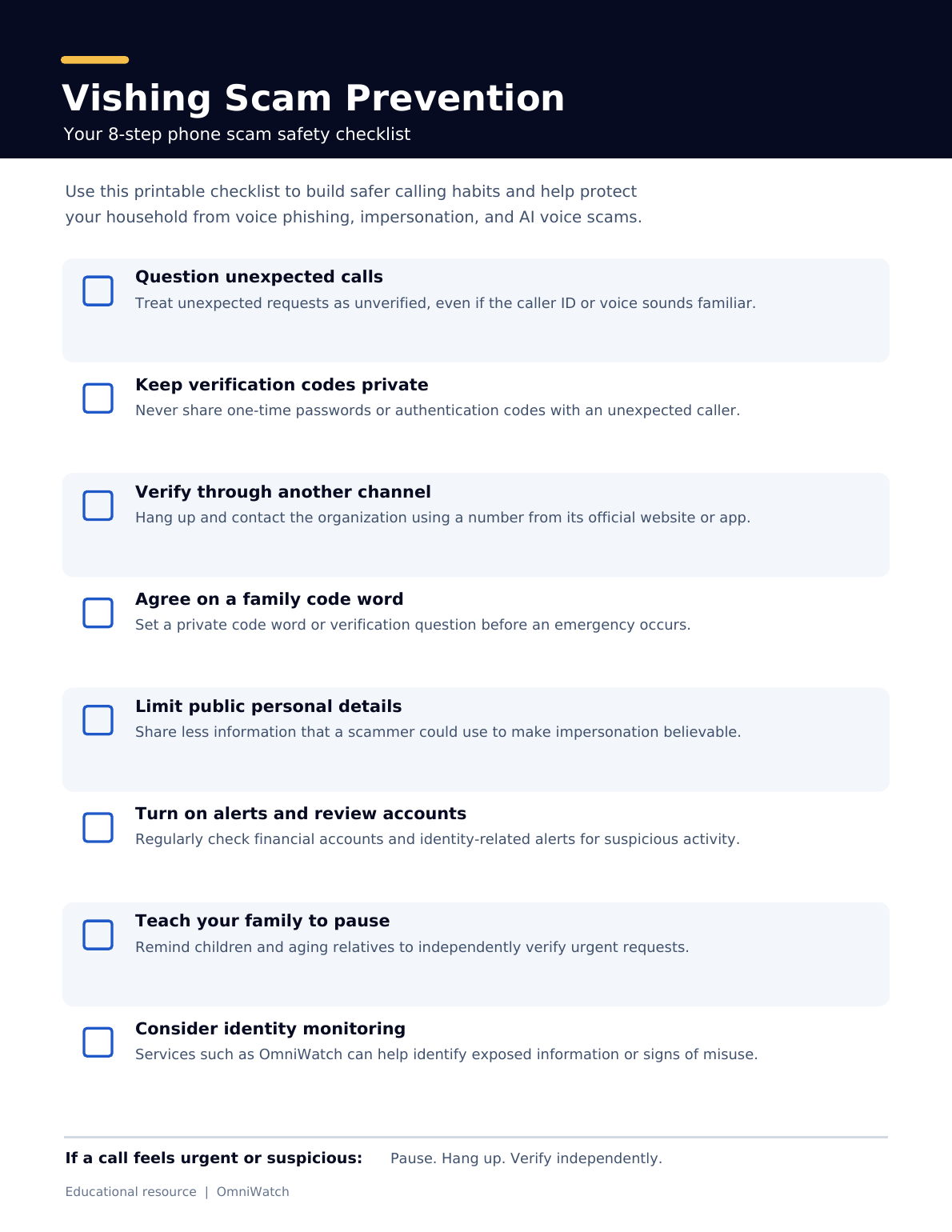
Treat unexpected requests as unverified, even if the number or voice looks or sounds familiar.
Never provide authentication codes to an unexpected caller. A legitimate organization will not ask you to read back a code they did not expect you to receive.
Use a separate, independently sourced channel to verify requests before acting.
Establish a family verification process. Agree on a code word or question before an emergency occurs.
Limit unnecessary public exposure of personal details that could make impersonation more convincing.
Review account alerts and monitor for identity or financial misuse regularly.
Teach children and aging relatives how to pause and verify urgent requests. A brief conversation now can prevent a costly mistake later.
Consider a monitoring service such as OmniWatch to detect exposed personal data early so you can act before it is used.
What you should do during a suspected vishing call
If something feels wrong, follow these steps:
Do not share sensitive information, passwords, or authentication codes.
Do not send money or follow payment instructions.
Do not install software or grant remote access.
End the call. You do not owe an explanation. Hanging up is always an option.
Verify the claim through a number or channel you already trust.
Preserve relevant details — the phone number, what was said, and the time of the call — in case you decide to report the attempt.
Simply answering a suspicious call does not by itself mean your accounts or devices have been compromised. The risk increases when you disclose information, share a code, install software, or send money.
What should you do if you give information or money to a vishing scammer?
If you shared information, credentials, account access, or money, act quickly based on what was exposed. Contact the affected organization through a verified channel, secure relevant accounts, and monitor for signs of misuse.
If you shared a password or authentication code
Change the affected password immediately from a trusted device.
Change the same password on any other accounts where you reused it.
Review active sessions, recovery settings, and recent account activity for anything unfamiliar.
Contact the service provider through an official channel to report the compromise.
Strengthen authentication settings where available, such as enabling multi-factor authentication.
If you disclosed card or bank information or sent money
Contact your bank, card issuer, or payment provider immediately through a verified number — the one on your card or statement, not one the caller gave you.
Explain that the transaction or disclosure resulted from a scam.
Ask what protective or recovery actions are available. Be aware that not all transactions can be reversed.
Review the account for unauthorized activity over the following weeks.
If you disclosed your Social Security number or other identity data
Monitor your financial and identity records for signs of misuse.
Follow current guidance from the FTC for step-by-step recovery.
Consider placing a fraud alert or credit freeze with the three major credit bureaus.
Document the event and all subsequent communications.
A convincing vishing call can lead to more than an immediate financial loss. It may expose personal information that can be used for identity theft. OmniWatch provides scam protection that uses AI-powered detection and monitors the dark web and Social Security number exposure for signs of misuse.
If a scam results in identity theft, OmniWatch also offers identity theft protection plans with up to $4 million in identity theft insurance and restoration support to help resolve identity theft.
When in doubt, hang up
Vishing is voice-based phishing that relies on impersonation and pressure. Caller ID spoofing and AI voice cloning can make a fraudulent call more convincing, but they do not change the safest response: end the unexpected call and verify the request through a trusted, separate channel. The core defense is refusing to act on an unverified, unexpected request.
If you're concerned about personal data exposure that could fuel future scams, OmniWatch scam protection monitors for exposed personal information so you can act before it's used against you.
What does vishing mean?
Vishing means "voice phishing." It is a scam conducted through a phone call or voice message in which someone impersonates a trusted person or organization to obtain money, sensitive information, credentials, or account access.
How can I tell if a phone call is vishing?
Common warning signs include unexpected urgency, threats, requests for passwords or authentication codes, unusual payment instructions, demands for secrecy, and resistance to independent verification. Because a convincing call can lack obvious warning signs, hang up and verify the request through a trusted channel.
Can scammers clone a family member's voice?
Scammers can use generated or imitated audio to sound like someone the target knows. A familiar-sounding voice is therefore not proof of identity. Call the person back on a saved number or verify the claimed emergency with another trusted contact before acting.
Is vishing the same as caller ID spoofing?
No. Vishing is a voice-based phishing attack, while caller ID spoofing is a technique that falsifies the number or name displayed for a call. A scammer may use caller ID spoofing as part of a vishing attack.
What should I do if I receive a vishing call?
Do not provide information, send money, install software, or share an authentication code. End the call and contact the person or organization through a phone number or channel you independently know is legitimate.
What should I do if I gave information to a vishing scammer?
Secure the affected accounts, change exposed or reused passwords, contact the relevant bank or service through an official channel, and monitor for unauthorized activity. If identity information such as a Social Security number was exposed, take additional identity-protection and credit-monitoring steps; consider services like OmniWatch for monitoring and recovery support.
Does answering a scam call mean I have been hacked?
Not necessarily. Simply answering a call does not by itself mean an account or device has been compromised. The risk increases if you disclosed sensitive information, shared an authentication code, installed software, granted access, clicked a link, or sent money.

This guide is published by OmniWatch. Follow OmniWatch on Facebook for ongoing guidance on identity protection, digital safety, and scam awareness.