
Smart cybersecurity for small business owners and freelancers
OmniWatch gives you enterprise-level protection against digital threats, built for the unique challenges of solopreneurs.


| Cybersecurity Incidents | Confirmed Data Disclosures | |
|---|---|---|
| Small Businesses | 3,049 | 982 |
| Medium- to Large-Sized Businesses | 2,842 | 751 |
Small businesses are big targets
Cybersecurity risks for freelancers, contractors, and entrepreneurs
Hackers often target independent contractors, freelancers, and gigsters to gain backdoor access to large, corporate networks. Several vulnerabilities increase the risk of cyber attacks on small businesses:
Common freelancing scams to watch out for
In today’s digital world, your identity is your business. Whether you’re managing clients, processing payments, or filing taxes, protecting your personal and professional identity is critical.
The FTC reports that job scam losses tripled between 2020 and 2023 and surpassed $220 million in the first six months of 2024 alone.1
Red flags that signal you should avoid working for someone include:
- Upfront payment requests — Anyone who requests a payment for you to do work is likely a scammer.
- Vague project details — Projects that don’t make sense or seem shady.
- Unrealistic promises — If it sounds too good to be true, it probably is.
- Payment after approval — They require you to submit work for approval before payment is sent.

Freelancer platform phishing
Fake clients lure you onto copycat platforms or ask for sensitive info under the guise of a job offer.

Malicious payloads
Harmful code and malware (placed within skill assessments) are used to gain access to your data or device.

Fake invoice scams
You or your clients are sent fake bills that appear legitimate—one click or payment can cost you thousands.
Business email compromise (BEC)
Hackers spoof your email to trick clients into sending payments to fraudulent accounts.

Data theft
Bad actors target small businesses to steal sensitive info and sell it on the dark web, such as credit card numbers, cryptocurrency wallets, and login credentials.

Payment fraud
Scammers send a fake payment, claim they overpaid, and ask for a refund. When the original payment bounces, the freelancer loses money.
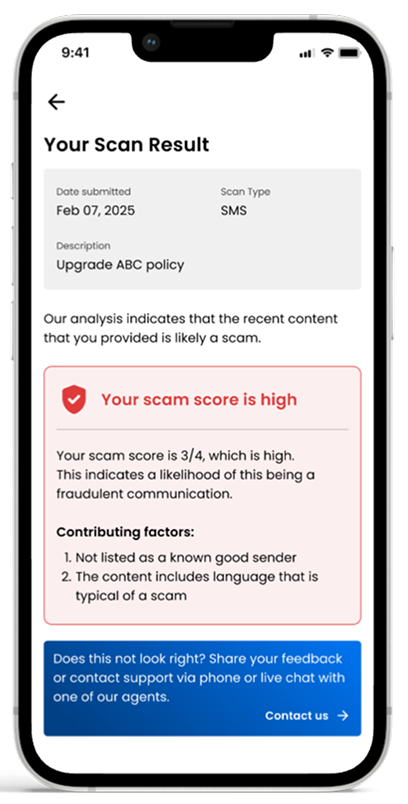
OmniWatch can detect cyber crime before it happens
Easy setup. No jargon. The protection you need with none of the enterprise bloat.
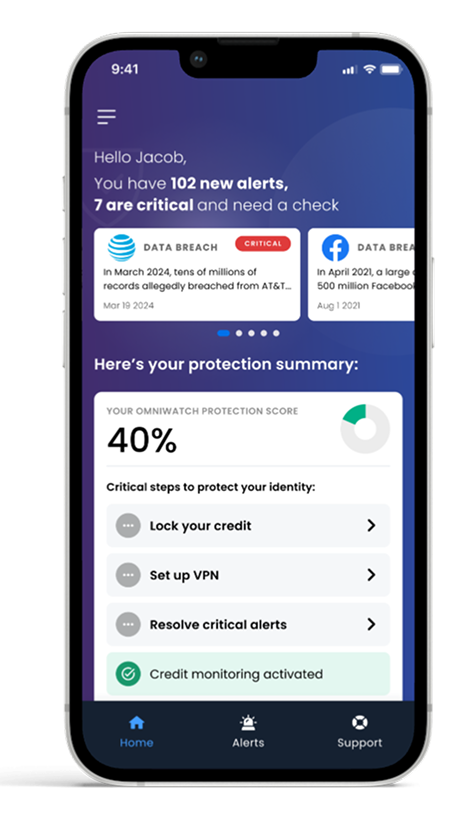
Always-on identity monitoring
We scan the dark web and data breaches for your unique info (name, SSN, email, login credentials, bank accounts, photos, etc).
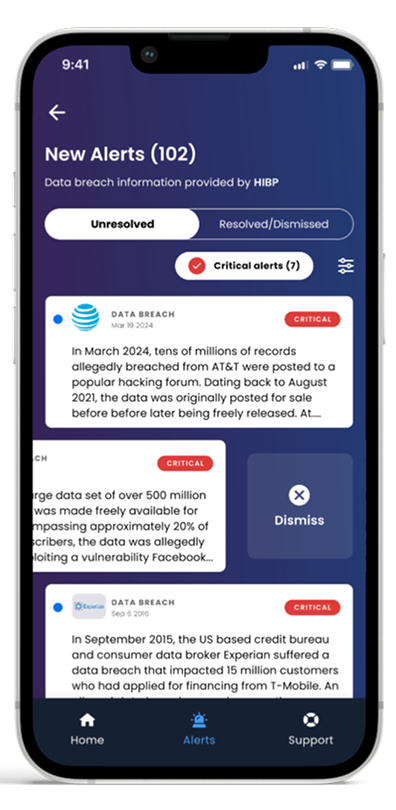
Financial and credit alerts
Business credit can be hard to earn and easy to lose. Get instant alerts if someone tries to use your identity to open accounts or make changes that impact your credit.
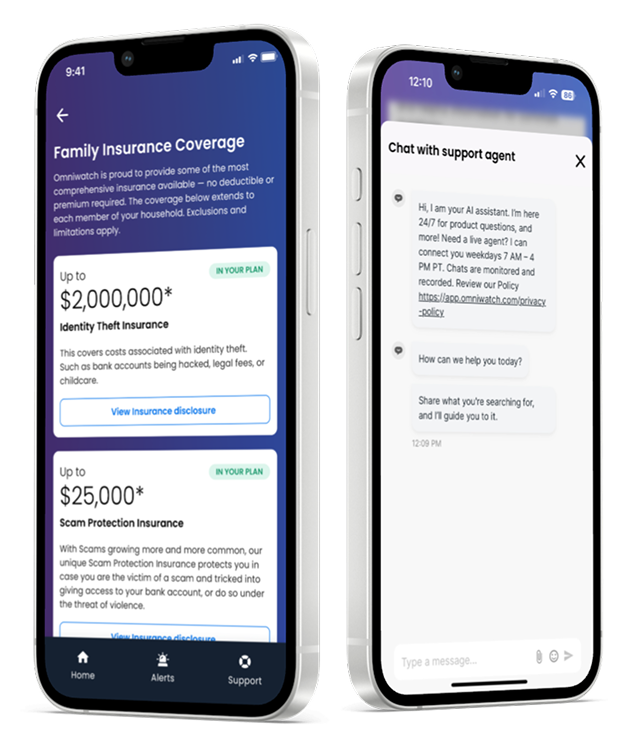
Expert identity theft resolution
Hit with identity theft? We’ll handle the paperwork, phone calls, and recovery — backed by up to $2M in identity theft insurance.*
Suited for solo operators
Unlike corporate solutions, OmniWatch is tailor-made for the fast-paced, resource-limited world of freelancers, consultants, and small business owners.
Real people. Real business. Real scam attempts.
Filter by Scam Type:

The most sophisticated scam I've encountered involved fake property owners using stolen identities to list homes they didn't actually own. These scammers had created convincing fake IDs, forged property documents, and even knew intimate details about the properties from public records and social media stalking the real owners. What made this particularly dangerous was their patience–they'd research homeowners who were traveling or temporarily relocated, then approach cash buyers like us with urgent sale stories. They had legitimate-looking paperwork and could answer detailed questions about the property's history because they'd done their homework on public records and neighborhood Facebook® groups. I caught them because I always require multiple forms of verification before making any offer. Instead of just reviewing the documents they provided, I cross-reference property records through completely separate channels, require in-person meetings at the actual property, and verify identity through multiple touchpoints. When they couldn't produce utility bills or neighbor references, red flags went up immediately. My single most effective protection strategy is "multi-source verification–never rely on documents or information that comes from just one source, especially when large amounts of money are involved. I always verify property ownership through at least three independent channels: county records, utility companies, and physical neighborhood verification. This approach has saved us from multiple six-figure fraud attempts.
Key Protection Strategy:
Multi-source verification–never rely on documents or information that comes from just one source, especially when large amounts of money are involved. Always verify through at least three independent channels.

The most sophisticated attempt I've encountered was a multi-stage social engineering attack targeting one of our business clients. The attackers spent weeks studying our client's organization, then called pretending to be from their IT department, referencing actual employee names and recent company events to build credibility. What made this particularly dangerous was their patience–they didn't ask for anything sensitive during the first few calls. Instead, they gradually built trust by "helping" with minor tech issues and slowly gathered intel. On the fourth call, they finally requested remote access to "update security software," which would have given them complete system control. We caught them because our client followed our standard verification protocol: they hung up and called their IT department directly using a known number. The attackers had spoofed caller ID and email addresses so convincingly that even tech-savvy employees were nearly fooled. My single most effective strategy is what I call "independent verification"–never trust a request for sensitive information or access through the same communication channel it came from. If someone calls claiming to be from IT, hang up and call IT directly. If it's an email, pick up the phone. This simple habit stops 90% of sophisticated social engineering attacks because scammers rely on keeping you in their controlled communication bubble.
Key Protection Strategy:
Never click links or download attachments from unexpected emails; verify sender through another channel.

The most sophisticated scam attempt I've encountered involved a multi-day social engineering campaign. The attack combined LinkedIn research, phone calls, and targeted emails to steal business credentials and gain system access. Everything began with a LinkedIn connection request from someone claiming to work at a firm our client had previously collaborated with. The profile contained accurate project details and mutual connections, making it appear legitimate. Over several days, they engaged in professional discussions, establishing credibility through knowledgeable conversation. The scam escalated when they requested a "quick consultation call" about a potential new partnership. During the call, they demonstrated detailed knowledge of our client's work and industry relationships, then casually mentioned needing access to a "shared document" for the proposal. They requested login credentials for the project management system, claiming their company used the same platform and needed to verify compatibility. What made this particularly sophisticated was the time investment and research depth. They'd clearly studied our client's company, recent projects, and professional network to create a convincing persona. The multi-channel approach using LinkedIn, email, and phone calls created a sense of legitimacy that would have fooled many security professionals. Our client protected themselves by following our verification protocol - independently confirming requests through separate channels. Before providing any credentials, they contacted the supposed company through official channels they researched independently. This revealed that no such employee existed at the partner company. My single strategy recommendation is to always verify requests through independent channels, regardless of how legitimate they appear. When someone requests sensitive information or access, contact the organization they claim to represent using official contact methods you research separately. This simple step defeats even the most sophisticated social engineering attempts. This experience reinforced for me how modern scammers leverage publicly available information to create convincing narratives that bypass traditional security awareness.
Key Protection Strategy:
Never click links or download attachments from unexpected emails; verify sender through another channel.

I've dealt with countless security threats, but the most sophisticated was a fake client inquiry that turned into a multi-week domain hijacking attempt. The scammers posed as a luxury hotel chain wanting a rebrand, complete with a detailed brief and budget discussions that lasted three weeks. What made this brilliant was they gradually asked for "temporary access" to our development servers to "review our security protocols before signing the contract." They even sent fake contracts with real legal letterhead and referenced actual industry connections. I almost fell for it because they knew specific details about our previous luxury brand projects. I caught them when they pushed for server access before any contracts were signed. Legitimate clients never ask for early access to your servers. We always separate our development environments completely and never give clients direct server access, only staging site previews. When I insisted on our standard protocol, they disappeared overnight. My single strategy: Never deviate from your established security protocols, no matter how legitimate or urgent the request seems. We have a strict rule that no one gets backend access until contracts are signed and payments processed. This simple boundary has saved us from at least five sophisticated attempts in the past two years.
Key Protection Strategy:
Always confirm payment requests through a second communication method before sending funds.

One of the most sophisticated scam attempts I've encountered involved a highly convincing phishing attack targeting a crypto wallet recovery service client. The scammers meticulously replicated a popular exchange platform's interface, complete with functional links and realistic transaction histories. They even used advanced social engineering tactics, like creating a sense of urgency in their communication, to pressure the victim into sharing sensitive credentials. The single most effective strategy I recommend is adopting a zero-trust mentality, always verify before sharing information. This means always double-checking URLs, independently contacting service providers for legitimacy, and avoiding sharing private keys or sensitive data.
Key Protection Strategy:
Never click links or download attachments from unexpected emails; verify sender through another channel.

Over the years, I've gotten used to spotting sketchy emails and fake leads, but this one caught me off guard. It was a fake job offer that came with a real phone interview, official-looking HR forms, and a push for personal details to "run a background check." Everything looked legit. What raised a red flag was how fast they moved and how polished it all looked. Before sharing any details, I typed the company's name into Google along with the word "scam." Right away, I found posts from other people who'd gone through the same thing. That's what stopped me from going any further. If you're ever unsure, especially with remote offers, don't rely on what they give you. Look them up on your own, double-check details, and trust your gut. A five-minute Google search can protect you from a world of trouble.
Key Protection Strategy:
Never click links or download attachments from unexpected emails; verify sender through another channel.

After 30 years in commercial roofing across New Jersey, the most sophisticated scam I faced was a fake "emergency storm damage" operation targeting property managers after Hurricane Ida. These scammers had detailed aerial photos of actual roof damage, professional insurance documentation templates, and even knew specific manufacturer warranty terms for detailed systems. What made them dangerous was their urgency tactics–they claimed FEMA deadlines required immediate contracts and demanded 50% deposits "to secure materials before shortages." They even had fake certification documents that looked legitimate. I nearly fell for it because they knew our industry terminology perfectly. The thing that saved me was my standard practice of calling manufacturer reps directly to verify contractor certifications. When I contacted our rep about their "certified installer," they had no record of the company. I also cross-referenced their business license with New Jersey Division of Consumer Affairs–it was fake. My single strategy: Always verify contractor certifications directly with manufacturers, not through documents they provide. Real certified contractors welcome this verification because it proves their legitimacy. This saved me $85,000 and I've used this same check to help three other property managers avoid similar scams since then.
Key Protection Strategy:
Hang up and call the official number listed on the organization's website to verify legitimacy.
Trustpilot reviews from real users who use OmniWatch
These are some of our favorite reviews from real users who trust OmniWatch for their identity protection needs.
See our TrustPilot reviews
Protect what you’ve built
Your identity is the foundation of your brand and business. Don’t leave it vulnerable.
Start protecting your livelihood in minutes.
Cancel anytime.
- Verizon Business, 2025 Data Breach Investigations Report
- FTC, 2024
- IC3, 2024 Annual Report