
 Call us at (877) 892-8249
Apple Pay Scam Texts: How They Work and What to Watch For
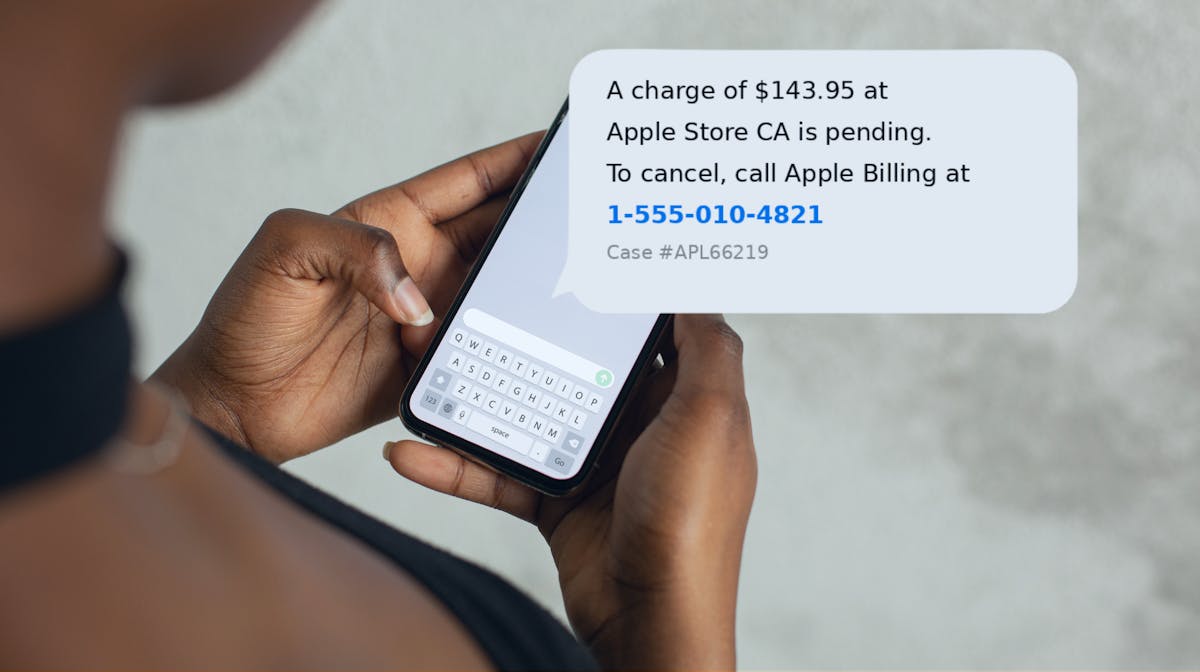
An Apple Pay scam text may claim there has been suspicious or unverified Apple Pay usage and urge the recipient to take immediate action.
The fraud often begins with a text but continues through a fake website or phone call. Pay scam texts are fraudulent alerts designed to impersonate Apple Support and trick you into calling a number, clicking a link, or handing over your Apple ID to a scammer.
As alarming as these fake texts seem, they don’t actually mean that your account was compromised—but you could get scammed if you respond to the message. If a scammer deceives you into sending them money, neither Apple nor your bank is required to recover your losses.
Before you respond to what you think is an Apple Pay text alert, learn the signs of Apple Pay fraud. We’ll cover how these scams work, which types are most common, and what happens to your money if you unknowingly pay a scammer.
How exposed is your personal information?
Take our free risk quiz to see where your data may be exposed online.
Take the Risk Quiz
What does an Apple Pay scam text look like?
A message may say:
“Apple Pay Alert: An unverified $894 payment was attempted. If this wasn't you, call immediately.”
The number in the text belongs to the scammer.
When you call, the person pretends to be security support and asks for passwords, verification codes, or account information.
The original unverified Apple Pay usage text message is simply the first step.
What should you do with an unverified Apple Pay message?
If you receive an unverified Apple Pay usage text scam or suspicious unverified Apple Pay text, do not use the phone number or link supplied in the message.
Check transactions through your official wallet, bank, or card account.
If nothing appears there, that is strong evidence the message itself may be fraudulent.
What are fake Apple Pay messages trying to steal?
A fake Apple Pay message may aim to collect Apple credentials, banking information, card details, or multifactor authentication codes.
For example, a fake support agent might say:
“I just sent a six-digit cancellation code. Read it to me so I can block the fraud.”
The code may actually authorize the scammer's login attempt.
Real security codes should not be shared with an unsolicited caller.
What about Apple Cash scams?
Apple Cash scams can include fake purchases, impersonation, and payment requests.
For example, someone selling an item online may be sent a fake payment confirmation and told that the funds will be released only after they pay a “business account upgrade fee.”
Always verify money inside the official account rather than through screenshots or emails supplied by another person.
What should you do after an Apple Pay scam?
If you gave away credentials, change them immediately.
If you shared a verification code, review account access.
If money or card information was involved, contact the relevant financial institution through official channels.
Fast action can limit the damage even after a mistake has already occurred.
Key takeaways
- Apple Pay scam texts look real, but they’re not. They impersonate Apple Support using official-looking transaction IDs, dollar amounts, and store names.
- Scam texts are a trap. The moment you click a link or call the number provided, you’re at risk for getting scammed.
- Apple Cash has zero buyer protection. Once a payment is accepted, it can’t be reversed.
- You can’t get reimbursed by Apple or your bank if you send money—even to a scammer!—on Apple Pay.
- OmniWatch scam insurance has plans that cover up to $50,000 across all payment platforms (including Apple Cash) with zero deductible.
What is an Apple Pay scam text?
- Apple Pay scam texts are SMS phishing (smishing) messages that impersonate Apple alerts. They arrive out of the blue, whether or not you’ve recently used Apple Pay, and they're engineered to look exactly like a real Apple security notification.
A typical message includes:
A fabricated transaction amount—often oddly specific, like $158.54
A fake case ID or confirmation number
A store location—usually "Apple Store," Walmart, or Target
A toll-free phone number or shortened URL for you to "dispute" the charge
These texts exploit the trust people associate with Apple. A “security alert” with polished messaging, fabricated specifics, and formatting that mimics Apple’s branding makes the text feel urgent and credible. However, once you respond by calling the number or clicking the link, you’ve fallen for the trap.
If you call the number, the scammer poses as Apple Support and asks for your account credentials and payment details.
If you click the link, one of two versions plays out:
The link leads to a loading screen that returns a fake “incorrect password” error to trick you into entering multiple password variations.
The link leads to a fake website that mimics Apple’s login pages and captures your credentials and two-factor authentication (2FA) code in real time; this allows the scammer to immediately hijack your account without you knowing.
Despite its variations, the end-goal of the Apple Pay scam text is the same: the scammer gains access to whatever personal details you shared—before you realize something went wrong.
What an Apple Pay scam text looks like
If you receive a text with similar messaging to the example below, don't respond. It's a scam.
text message
A transaction of $158.54 at the Apple Store has been blocked. If this wasn't you, call 1-800-XXX-XXXX immediately. Case ID: APL-2026-8847.
The 7 most common Apple Pay scam types
Fake text alerts are just one type of fraud that capitalizes on Apple’s payment features**.** Below are the seven most common Apple Pay and Apple Cash scams, including how they work and what red flags to watch for.
1. Fake transaction alert text (smishing)
This is the Apple Pay scam text message that we just described in detail.
How it works:
You receive a text claiming that an unauthorized transaction occurred. You call the "Apple Support" number, and the scammer asks you to share your Apple ID credentials or payment details to “resolve” the issue.
Red flags:
Message includes urgent language and a phone number or link to follow up
Message comes from a random number or non-Apple email domain
Example:
text message
APPLE ALERT: A charge of $143.95 at Apple Store CA is pending. To cancel, call Apple Billing at 1-888-XXX-XXXX. Case #APL66219.
2. Overpayment scam (marketplace)
The overpayment scam is a common tactic used by scammers who pose as buyers on popular online marketplaces. (For details on how this scam type works for various marketplace platforms, see our guides to Facebook Marketplace scams, Craigslist scams, and OfferUp scams.)
How it works:
After agreeing to a sale, an alleged buyer claims they “accidentally” overpaid you via Apple Pay or Apple Cash; they ask you to refund the amount they overpaid. The original payment was either fake or made with a stolen card.
When the real cardholder disputes the fraud charge, the bank reverses the payment—and you lose both the item you shipped and the refund you sent to the scammer.
Red flags:
“Buyer” offers more than the asking price for an item you’re selling
They insist on paying via Apple Pay or Apple Cash
They pressure you to ship before payment clears
Example:
direct message
Hey, I'm so sorry, I accidentally sent you $250 instead of $150! I got an error message from Apple, but my bank said it went through. Can you send the extra $100 to my Venmo account so I can pay my rent?
3. Fake payment screenshot
As with the overpayment scam, the scam involving a fake payment screenshot is especially common in peer-to-peer marketplaces.
How it works:
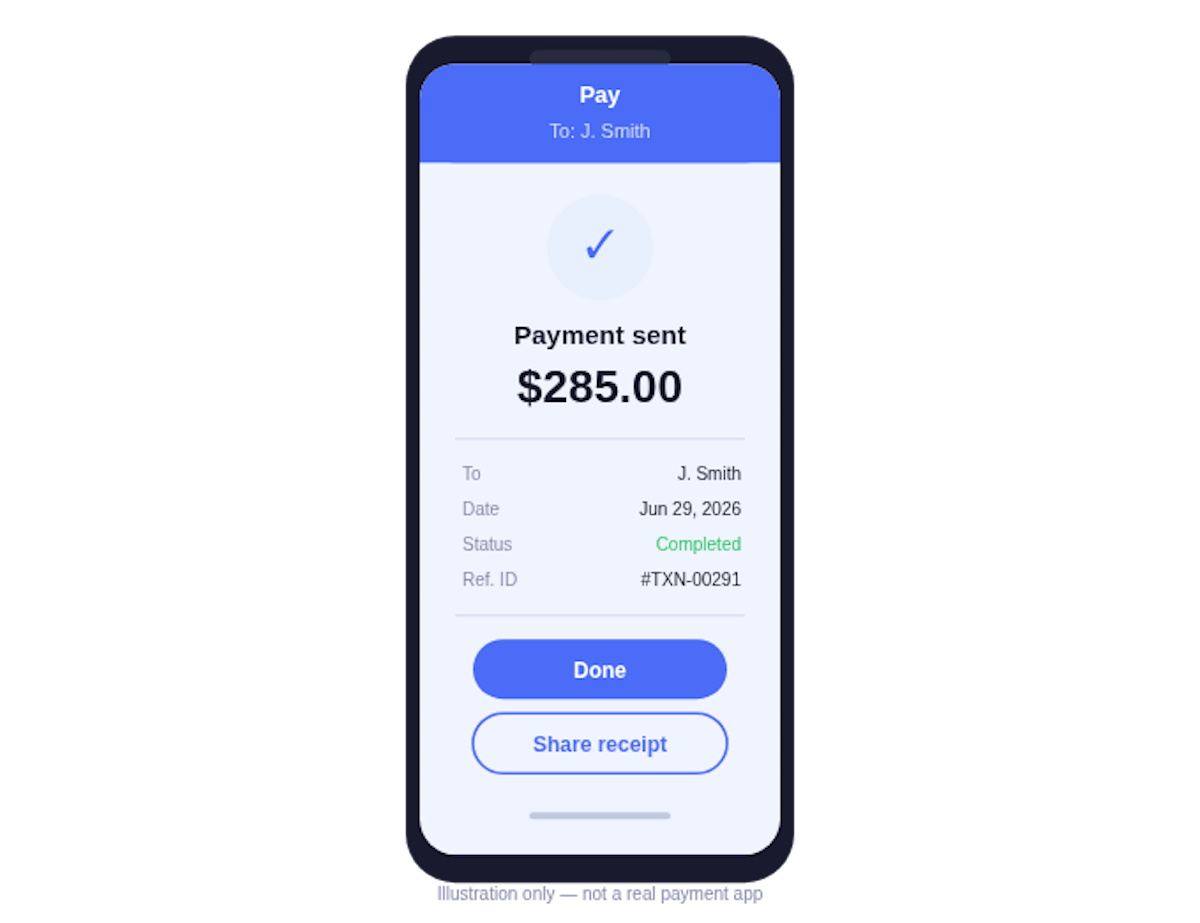
Posing as a buyer, a scammer sends a screenshot confirming they paid you for an item you’re selling online. The screenshot is doctored to replicate Apple Pay or Apple Cash’s real proof of payment. You ship the item, but the money never arrives.
Red flags:
“Buyer” claims they sent payment but nothing appears in your Wallet app or bank account
They push you to ship immediately after sending the payment screenshot
Example:
direct message
Hey, I just paid you
4. Random Apple Cash transfer + "wrong number"
This scam works similarly to the overpayment scam.
How it works: A scammer sends you an Apple Cash payment for a sale you didn’t make, or they claim they sent you money by accident. The payment shows up in your Wallet app. They ask you to refund the money via Apple Cash or gift card.
The original payment sent to you was made with a stolen card. When the real cardholder disputes the fraud charge, the bank flags the transaction as fraudulent and reverses the payment from your account.
Red flags:
You receive an unsolicited Apple Cash payment from a stranger
They want the money returned via Apple Cash or gift card
Example:
text message
Hey, I just sent you $30 by accident - I meant to send it to a different number. Can you send it back to me asap? I need to get it to my friend.
5. Money mule via Apple Cash
This scam can work like the random Apple Cash transfer described above, or it can play out once the scammer builds trust or intrigue through an online relationship or enticing job offer.
How it works:
A scammer sends stolen funds to your Apple Cash account. They reach out to convince you to forward the money somewhere else.
Example:
direct message
Hey, I need to transfer some cash. Can you help me out?
Red flags:
A fake employer, online "friend," or romantic interest asks you to receive and forward payments
You're told to act quickly and keep the arrangement confidential
6. DocuSign + Apple Pay combination scam
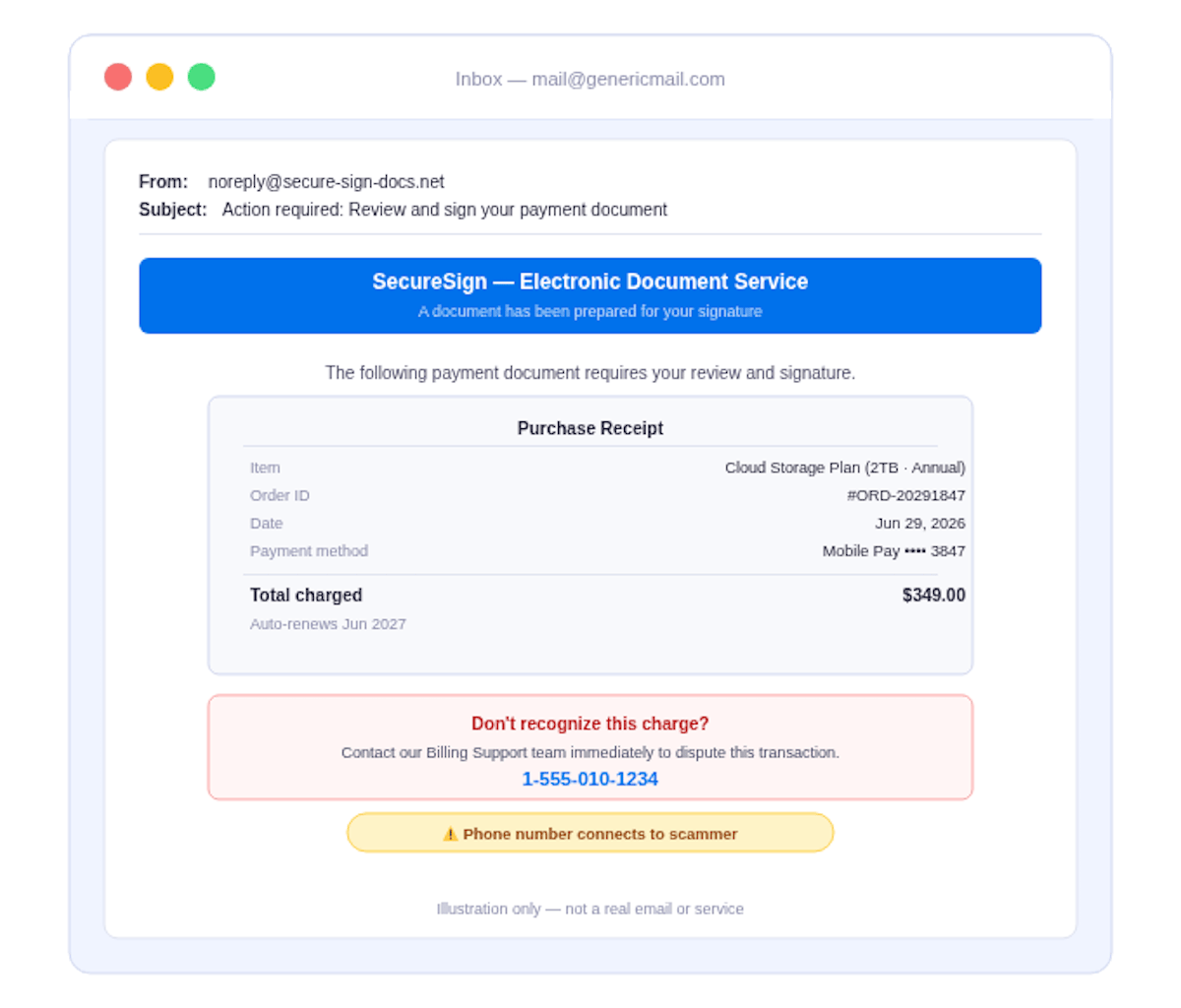
This scam is a variation of the Apple Pay scam text. It uses both the Docusign and Apple brands to make the alert look credible.
How it works:
You receive an email that appears to come from DocuSign; it contains a receipt and order ID for a subscription purchased via Apple Pay. The email advises you to call “Apple Support” to dispute the charge if you don’t recognize it; the number listed in the email is actually a scammer-controlled line.
Red flags:
An unsolicited DocuSign email involving a payment dispute
The document includes a phone number rather than a link to Apple's official site
Example:
7. Apple ID phishing via fake 2FA
This sophisticated phishing tactic can hand over full account access to scammers within seconds. Apple will never ask for a 2FA code over the phone or in a text. If someone does, hang up or block the number immediately.
How it works:
You receive a fake text or call claiming that Apple needs to verify your identity due to “suspicious activity.” The message prompts you to enter a real 2FA code from Apple, which the scammer can intercept as you enter your code and login credentials.
Red flags:
- Any call or text asking you to read back a verification code you just received
Example:
text message
Your Apple Account Code is: 994977. Don’t share it with anyone.
What Apple Pay actually covers versus what it doesn't
Apple Pay and Apple Cash are distinct payment features on Apple. While both features are targeted by scammers, their differences impact whether or not you get reimbursed for fraudulent transactions.
Apple Pay is a mobile payment system that links to your credit or debit cards. Buyer protection is decided by your card issuer (Visa, Mastercard, Amex, or your bank), not Apple.
Apple Cash is a peer-to-peer (P2P) payment method supported by Apple Pay. Apple Cash does not offer buyer protection or a payment dispute process because it works like real cash: once you send payment, the funds typically can’t be reversed.
The only exception is if a payment hasn't been accepted yet. Then it will show as pending in your transaction history; you can cancel the payment in your Wallet app.3
Apple Pay coverage at a glance
Feature | How it works |
Apple Pay unauthorized transaction coverage | Handled by your card issuer, not Apple. Visa, Mastercard, Amex, and most banks will cover unauthorized transactions. |
Apple Cash buyer protection | None offered. Apple Cash is treated as cash: once accepted, it can't be reversed or disputed. |
Pending Apple Cash payment | Payment can be canceled before the recipient accepts it. Payment can't be reversed or disputed once it's accepted. |
Apple Pay / Apple Cash scam protection | None offered. Apple Pay or Apple Cash will not cover authorized transactions, even to scammers. |
Chargeback via linked card | Handled by your card issuer. A chargeback is possible if you sent payment with a linked credit card, not Apple Cash. |
To compare P2P payment methods, see our other guides:
Apple Cash has no buyer protection, even for money sent to a scammer. OmniWatch has up to $50K scam insurance with zero deductible.
See full coverageThe dangerous landscape of P2P payment scams
Apple Pay is generally a secure platform to send and receive payments. However, Apple Pay and other P2P payment services become unsafe when scammers imitate their brand to deceive you into sharing your personal or financial information.
Scammers know that people associate Apple with trust and authority. They leverage the brand’s name and imagery to deceive users into falling for fake security alerts or payments.
If the victim believes the setup, they’re likely to quickly “resolve” the issue using the scammer-controlled numbers or links provided with the fraudulent messaging used in Apple Pay scam texts. If the scam involves Apple Cash instead, the victim could be tricked instead be deceived into making payments that can’t be reversed or disputed.
P2P payment scams that imitate payment services like Apple Pay and Apple Cash fall under a category of fraud called imposter scams. As of 2025, imposter scams were the second-most-reported fraud category (behind identity theft), with about 1 in 5 people reporting financial losses.4 Meanwhile, Apple Pay ranked among the five most commonly named P2P payment apps in consumer fraud reports, alongside PayPal, Cash App, Zelle, and Venmo.5
Why your bank won't cover Apple Pay scams
If you get scammed using Apple Pay, your bank probably won't cover your losses. Banks’ standard fraud protections typically don’t apply to victims of fraud on P2P payment services.
Under the Electronic Funds Transfer Act (EFTA) and Regulation E, banks are only required to cover fraudulent transactions initiated by someone else. These are classified as unauthorized transactions.
Banks are not required, however, to cover fraudulent transactions initiated by you. These are called authorized transactions because you technically authorized payment to be sent from your account to the scammer.
Apple Pay scams are part of a specific type of authorized transaction called Authorized Push Payment (APP) fraud, which happens when scammers manipulate victims into sending money via P2P for other online payment systems.6
What this means: If you send money via Apple Pay or another P2P platform (Zelle, Venmo, Cash App, PayPal, etc.), your bank probably won’t reimburse you—even for money you mistakenly send to a scammer.
What actually protects you from Apple Pay scams
Apple Cash doesn't offer scam protection, and banks don’t cover APP fraud or other authorized transfers. OmniWatch scam protection plans fill this coverage gap to protect you from Apple Pay scams. Here’s what OmniWatch scam insurance offers:
Up to $50,000 in scam reimbursement insurance
Zero deductible—reimbursing the full amount lost to a scam
Coverage for P2P and other payment platforms—Apple Cash, Zelle, Venmo, wire transfers, or gift cards
APP fraud coverage—including transaction types and services that Apple and banks won’t cover
AI-powered scam detection—flagging suspicious links before you send money
Live scam recovery specialists—real humans based in the U.S. who advise you when confronted with potential or actual scams
A 2025 OmniWatch survey found that only 20% of U.S. adults use any kind of identity protection service.7 Because Apple Pay scams are so convincing, Americans are at high risk of unknowingly sending money or personal data to a scammer.
If you were targeted by an Apple Pay scam, act now!
Email a screenshot or forward suspicious messages to reportphishing@apple.com8
Report an Apple Cash transaction issue to Apple Support
File an FTC fraud report at reportfraud.ftc.gov
Protect yourself from additional fraud attempts with OmniWatch's scam insurance
Don't lose your money to Apple scams
Despite Apple’s overall safety, it offers limited protection if you get scammed on Apple Pay or Apple Cash. Here are the takeaways:
Apple Pay scam texts are a type of high-volume, high-sophistication APP fraud that are engineered to make you act before you think.
Apple Cash has zero buyer protection once money is sent, so your payments can’t be reversed.
Apple Pay and your bank are unlikely to help if you authorized a transaction to a scammer—even if you did so without realizing it.
Article updated October 16, 2026
OmniWatch covers what Apple and your bank won't.
See how OmniWatch compares to relying only on Apple’s limited protection policies. For the broader picture on Apple Pay’s security features and red flags to watch for, see our full platform safety guide.
See how OmniWatch comparesFrequently asked questions
What is an Apple Pay scam text?
How can I tell if an Apple Pay alert is real or a scam?
Does Apple Pay offer buyer protection?
Does Apple Cash have buyer protection?
Can I get my money back if I was scammed through Apple Cash?
Will my bank reimburse me if I was scammed through Apple Pay?
What should I do if I received a suspicious Apple Pay text?
What is Authorized Push Payment fraud?
This guide is published by OmniWatch. Follow OmniWatch on Facebook for ongoing guidance on identity protection, digital safety, and scam awareness.
1 Apple, Send and receive money with Apple Cash
2 DocuSign, Incident Reporting - Security Concerns
3 Apple, If you have an issue with an Apple Cash transaction
4 Tableau Public, FTC Consumer Sentinel Network Data Book 2025
5 FTC, Who’s who in scams: a spring roundup
6 Federal Reserve Bank of Kansas City, Combating Authorized Push Payment Scams in Fast Payment Systems
7 OmniWatch, Identity Theft Survey